



Most people use AI in one of two ways. Either they avoid it for anything that matters, worried it will get something wrong, or they use it for everything and copy the output without a second look. Both approaches leave value on the table. A simple three-step method, plan, prompt, verify, gets more useful results from AI on everyday tasks while keeping you in control of the outcome.
This is not a technical framework. It works for writing an email, researching a decision, drafting a document, or working through a problem, and it takes barely more time than jumping straight into a prompt without thinking first.
Why jumping straight to a prompt produces mediocre results
The most common way people use AI is also the least effective: opening a chat window and typing whatever comes to mind first. This produces generic output, because a vague prompt can only produce a generic answer. The AI has no way to know what you actually need if you have not decided that yourself before you started typing.
The other common failure is the opposite problem: getting a reasonable-looking answer and using it without checking whether it is actually accurate or actually fits the situation. This is where the earlier steps in this method matter as much as the last one.
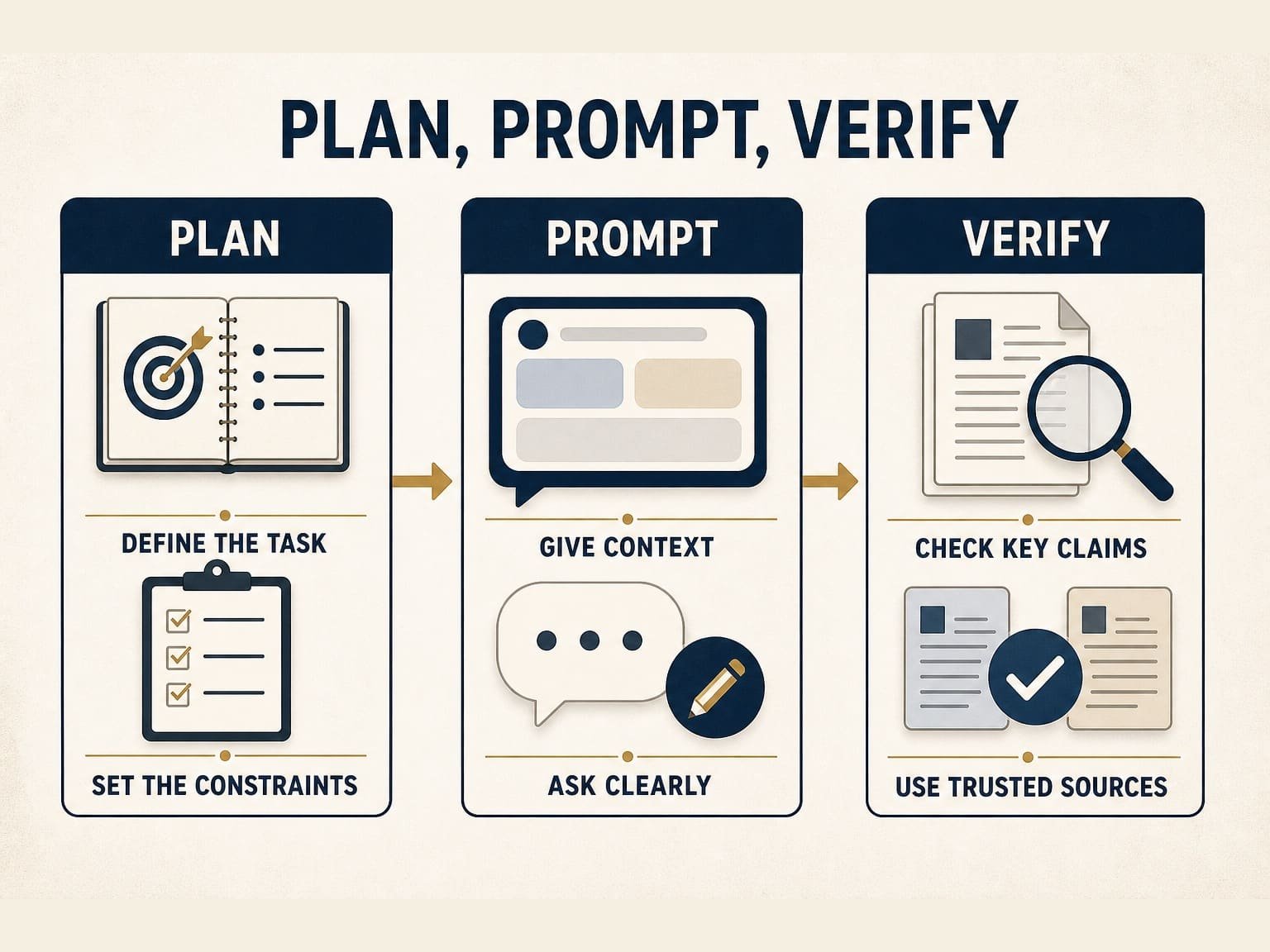
The Plan, Prompt, Verify method
Step 1: Plan, before you open the AI tool
Spend thirty seconds deciding what you actually want before you start typing. What is the specific outcome you need? What context does the AI need to know to produce something useful, rather than something generic? What would a genuinely good answer actually look like, so you will recognize it if the AI gives you one? This planning step is short, and skipping it is a common reason AI output ends up feeling generic. Stanford’s guidance on AI literacy points to prompt structure, context, and word choice as factors that shape how useful an AI response turns out to be, which is the underlying reason a vague request tends to produce a vague answer.
Step 2: Prompt, with the specifics you identified
Write your actual prompt using the context and outcome you defined in Step 1. Include relevant specifics: the audience, the constraints, the tone, the format you need, anything the AI would otherwise have to guess. A prompt with real context produces a first draft you can actually use. A prompt without it produces something you will likely rewrite entirely, which usually takes longer than doing the planning step would have.
Step 3: Verify, before you use or share the output
Before you act on, publish, or share what the AI produced, check it. For factual claims, verify anything specific against an independent source rather than trusting the AI’s confident tone. For anything you did not have context on, re-read it critically rather than assuming it is correct because it reads smoothly. For anything you are about to send to someone else or use to make a decision, this step is not optional. For more detail on how to scale this verification step to the stakes involved, see our full guide on verifying AI-generated information before you act on it.
A worked example
Say you need to draft an email declining a request without damaging the relationship. Jumping straight to a prompt might produce something generic and slightly stiff. Using this method, the plan step identifies the actual goal (decline clearly, keep the relationship warm, keep it brief), the specific context (your relationship with this person, why you are declining), and what a good version looks like (warm but clear, not over-apologetic). The prompt includes all of that context directly. The output is closer to something you can actually send with minor edits, rather than something generic you have to substantially rewrite. The verify step is quick here, mostly a read-through to confirm the tone is right and nothing was misrepresented, but it still happens before the email goes out.
Where this fits with weekly planning
This method works well for individual tasks throughout your day. If you also want a structured approach for using AI to plan your entire week, not just individual prompts, without letting the AI make the priority decisions for you, see our guide on planning your week with AI, which applies a similar plan-first principle at the weekly level instead of the single-task level.
A reusable prompt template
Here is a short template you can adapt for the plan and prompt steps together, useful for tasks like drafting a message, summarizing something, or working through a decision.
“I need help with [specific task]. The outcome I want is [specific outcome]. Relevant context: [audience, constraints, tone, format, or background the AI needs]. Here is what a good result would look like: [brief description]. Please draft this, and note anywhere you are uncertain or making an assumption.”
Asking the AI to flag its own uncertainty or assumptions makes the verify step faster, since it points you toward the parts of the answer that need a closer look first.
Common mistakes
- Skipping the plan step because it feels like it slows you down. A short planning pass upfront often costs less time than rewriting a generic first draft afterward.
- Treating a confident-sounding answer as a verified one. Tone and accuracy are not the same thing, and AI output does not signal the difference.
- Verifying everything equally, including low-stakes brainstorming. Match your verification effort to what is actually at stake, not to a fixed routine.
- Never adjusting the prompt after a weak first result. A weak answer is often a sign the plan step needs revisiting, not that AI simply cannot help here.
Make this a daily habit
If you want a structured, repeatable system for using this method across your daily productivity, the AI Productivity Planner builds plan, prompt, verify into its 30-day workflow. You can also start with the free 7-Day AI Productivity Starter Kit for a shorter introduction to the method.