



A lot of people who try to plan their week with AI run into the same mistake. They open a tool, describe their week in a sentence or two, and let the AI hand back a finished schedule. It feels efficient for about a day, then it quietly falls apart, because the AI never actually knew what mattered most to you. It only knew what you typed.
AI is genuinely useful for weekly planning. It is fast at organizing, fast at spotting conflicts, and fast at turning a messy list into a structured draft. What it cannot do is decide your priorities for you, because priorities come from context AI does not have: your energy patterns, your actual commitments, the promises you have already made to other people, and the parts of your week that matter more than they look on paper.
Here is a system for planning a week with AI without handing over the one job that has to stay human: deciding what matters.
Why AI-generated weekly plans quietly fail
A calendar, even an AI-built one, can only show you what is scheduled. It cannot tell you what should be scheduled. That distinction is the entire problem. When you ask an AI tool to “plan my week,” it fills gaps, balances your stated tasks, and produces something that looks organized. But it has no way to know that Tuesday’s call matters more than Wednesday’s task, or that the project you listed casually is actually the one thing that needs protecting from interruptions.
The result is a schedule that is technically full and practically wrong. You follow it for a day or two, notice it does not reflect your real priorities, and either abandon it or start manually overriding it so often that the AI stops saving you time at all.
The AI Suggests, You Decide system
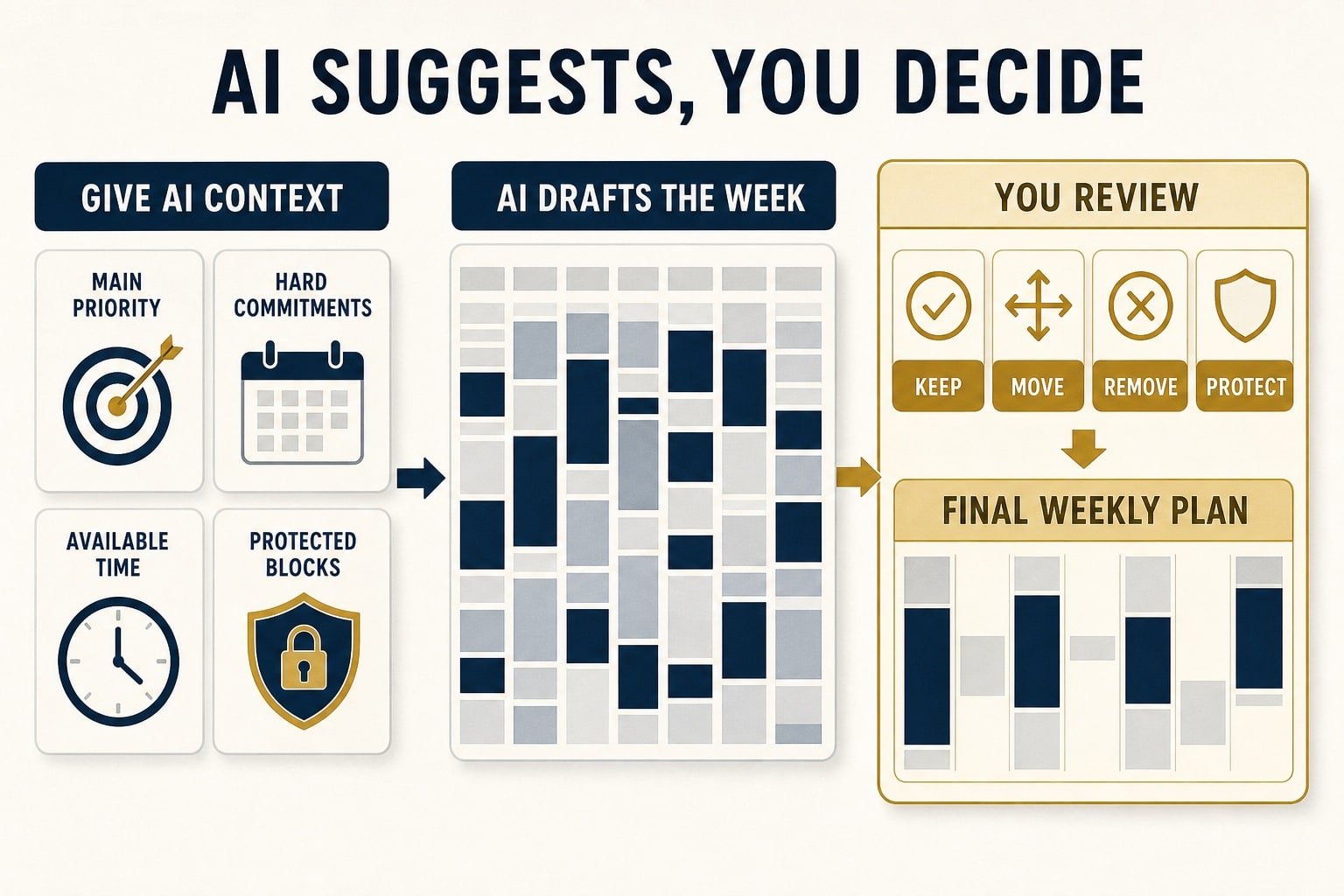
The fix is not to stop using AI for planning. It is to change what you ask it to do. Instead of asking AI to decide your week, you ask it to draft options, and you make the actual priority calls yourself. Here is the full weekly process.
Step 1: Do a five-minute priority pass before you open any AI tool
Before you type anything into a planning tool, write down three things by hand or in a plain note: your one non-negotiable priority for the week, anything with a hard deadline, and anything you have promised to another person. This takes five minutes and it is the step every AI-only planning method skips. It exists specifically so the AI is working from your judgment, not guessing at it.
Step 2: Feed AI your real constraints, not just your task list
When you do use an AI tool to help build the schedule, give it more than a list of tasks. Tell it your fixed commitments, your energy pattern (for example, if mornings are your focused time and afternoons are for meetings), and the one priority from Step 1 that everything else needs to work around. The more real constraints you give it, the less the AI has to guess, and the less it will accidentally bury your real priority under lower-stakes busywork.
Step 3: Treat the AI draft as a first draft, not a final answer
Let the AI propose a structure for your week. Then read it against your Step 1 list and ask one question for each day: does this protect my actual priority, or just fill space efficiently? Move anything that does not pass that test. This review takes ten minutes and it is what separates a plan that fits your life from a plan that fits an algorithm’s idea of a balanced week.
Step 4: Build in one weekly checkpoint
Pick one fixed time, for many people this is Sunday evening or Monday morning, to run this whole process. A consistent checkpoint is what turns this into a system instead of a one-time trick. It also gives you a natural moment to notice when your priorities have shifted, so the next week’s plan starts from where you actually are, not from last week’s assumptions.
A worked example
Say your task list for the week includes a client presentation on Thursday, a backlog of email, a personal project you have been trying to protect time for, and two recurring meetings. An AI tool given just that list will likely spread everything evenly across the week, because it has no way to know the presentation matters more than the email backlog.
Using the system above, your Step 1 pass identifies the presentation as the non-negotiable priority and the personal project as something you are protecting. When you feed those constraints to the AI, you are explicit: protect two uninterrupted blocks before Thursday for presentation prep, and reserve one fixed block for the personal project that nothing else is allowed to override. The AI can still handle the logistics, slotting in the email time and meetings around those protected blocks, but the actual decision about what deserves protection came from you, not from the tool.
Common mistakes to avoid
- Skipping the priority pass because it feels redundant. It is the one step that keeps the system from becoming just another AI-generated schedule you ignore by Wednesday.
- Giving AI vague input and expecting sharp output. A tool can only work with what you give it. Vague tasks produce a plan that looks reasonable and fits nothing.
- Never revisiting the plan mid-week. Weeks change. A two-minute Wednesday check-in against your Step 1 list catches drift before Friday does.
- Using a different process every week. The value of this system comes from repetition. A plan you rebuild from scratch every week never gets easier. A repeatable process does.
Where this fits with a daily AI workflow
This weekly system pairs naturally with a simple daily habit for using AI on individual tasks. If you also want a straightforward method for using AI on the smaller, everyday decisions inside your week, not just the weekly structure, see our guide on the Plan, Prompt, Verify AI workflow, which covers how to use AI responsibly on individual tasks without either avoiding it or trusting it blindly.
The Weekly AI Planning Prompt
Once you have done your five-minute priority pass, here is a short prompt you can adapt and give to an AI tool. It gives the AI your real constraints instead of just a task list, and it makes clear that the AI is proposing a draft, not making the final call.
“Help me draft a weekly schedule. My one non-negotiable priority this week is [priority]. My hard commitments are [meetings, deadlines, appointments with times]. I have roughly [X hours] of flexible time this week. My energy tends to be highest during [time of day] and lower during [time of day]. Please propose a draft schedule that protects my priority and works around these constraints. I will review it and make the final decisions myself.”
Fill in the brackets with your own specifics from Step 1 and Step 2 above. The AI’s response is a starting draft for you to check against your actual priorities, not a finished plan to follow as-is.
Make it repeatable
A weekly planning system only works if it is easy enough to actually repeat. If you want a structured, printable version of this exact process, one built specifically around using AI as a planning assistant rather than a decision-maker, the AI Productivity Planner walks through 30 days of this system with the priority pass, weekly checkpoint, and review built in as a repeatable workbook.
If you want to try the core idea first before committing to the full system, the free 7-Day AI Productivity Starter Kit is a shorter version you can start this week.